

Display ads only pay well once a blog has serious traffic. Affiliate marketing works at any size: you recommend a product you already use, add a tracked link, and earn a commission when a reader buys. When I started, AdSense barely covered hosting. It took about six months to make a first affiliate sale, and then a single program paid $1,800 in one month. That changed how I run every blog since.
This guide walks through the 7 steps I follow to monetize a new blog with affiliate marketing, in order, with the tools I use. It was updated in October 2026 with current networks, plugin prices, and disclosure rules.
Step 1: Find the Products You Already Send Traffic To
If you have been blogging for a few months, you have almost certainly linked to products and services that run affiliate programs. Those are the easiest wins, because the traffic already exists.
Start by finding where your readers click out. Jetpack Stats shows this under Jetpack > Stats > Clicks, and Google Analytics 4 shows it under Reports > Engagement > Events (the click event). Give a new install a few days to collect data.

Make a list of the sites you send the most clicks to. Visit each one and look for a footer link that says “Affiliates”, “Affiliate Program”, “Partners”, or “Referral Program”. If there is none, search Google for [product] affiliate program; most SaaS and hosting companies run one through a network even when it is not on their site.

One rule before you join anything: only promote products you would recommend without a commission. A bad recommendation costs you reader trust, and trust is the whole business.
Step 2: Find Relevant Affiliate Programs
If step 1 came up short, go looking. The program has to fit your readers; web hosting pays well, but it will not convert on a cooking blog.
- List the products and services you personally use and check each for a program.
- Study the successful blogs in your niche: their sidebar, their “tools” or “resources” page, and their review posts show what they promote.
- Search Google for [your niche] affiliate programs.
- Join an affiliate network, which is a marketplace of thousands of programs with one login and one payment.
The networks worth joining first:
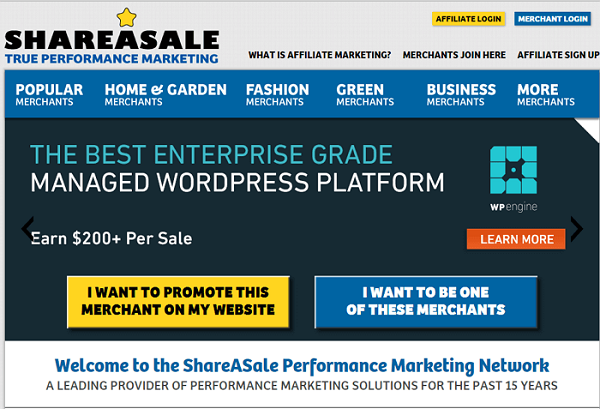
- ShareASale (now part of Awin): over 25,000 merchants across almost every niche, and the easiest to get approved on.
- Impact: hosts many big software and hosting programs (HostGator, Bluehost, Canva, and others).
- CJ Affiliate: one of the oldest networks, strong on big retail brands.
- ClickBank: digital products and courses, with high commission rates.
- Amazon Associates: the default for physical products, though rates are low (1 to 4 percent in most categories) and the cookie lasts only 24 hours.
For a longer comparison, see our list of the best affiliate networks for bloggers, and if applications keep getting rejected, these 12 things get affiliate applications approved.
Step 3: Cloak Your Affiliate Links and Add Them Automatically
Every program gives you a long tracking URL like https://partners.xyz.com/c/214426/177309/3094. Do not paste those into posts. Use a link manager plugin to turn them into clean links like https://roadtoblogging.com/go/xyz/. The real reason is not looks: when a program moves networks (HostGator moved from in-house to Impact, and ShareASale merged into Awin), you change the destination once in the plugin instead of editing hundreds of posts.
I use ThirstyAffiliates. The free version handles cloaking and click stats. Go to Dashboard > ThirstyAffiliates > Add New, paste the destination URL, and give the link a name.

The paid version (Basic from $99.60 for the first year) adds automatic keyword linking: you attach keywords to each affiliate link and the plugin turns every mention of those keywords across your old posts into affiliate links. If you wrote about products for years before monetizing, this one feature pays for itself in a week. The old separate Autolinker add-on no longer exists; it is now part of every paid plan.

Pretty Links is the main alternative and works the same way. Our full tutorial on managing affiliate links with ThirstyAffiliates covers categories, redirects, and link stats.
Step 4: Consider an Affiliate Aggregator
If you write about many products across many topics, joining programs one by one is slow. An aggregator such as Sovrn Commerce (formerly VigLink) or Skimlinks connects to tens of thousands of merchants at once. Add one script and it converts your existing outbound merchant links into affiliate links, and can link product names it finds in your content.
The trade-off is a lower rate: the aggregator keeps a share of the commission, and you have less control over which merchant each link goes to. Use it for the long tail of products you mention occasionally, and join direct programs for the handful you promote most.
Step 5: Add Affiliate Links to Your Most Popular Posts
A few posts bring most of your traffic. Monetize those first.
- Open Google Analytics (Reports > Engagement > Pages and screens) or Jetpack Stats (Top Posts & Pages) and sort by views for the last 90 days.
- Take the top 10 posts.
- Reread each one looking for places where you already recommend something, or where a product would solve the problem the post is about.
- Check how other bloggers monetize the same topic.
- If a post has no natural product fit, link it to one of your posts that does.
- Repeat for the next 10 posts a month later.

Do not force it. One relevant link that helps the reader outperforms five that interrupt them, and Google’s helpful content guidelines penalize pages that exist only to push products.
Step 6: Write Posts That Generate Sales
Some post types convert far better than others. Build these around the products you chose in step 2.
Review posts
Write from real use, include the cons, show screenshots, and give a clear recommendation and any discount. Target keywords like [product] review, [product] pricing, and [product] problems. Add Review schema (Rank Math and Yoast both do this) so your rating can show as stars in search results, which lifts click-through rate. See our star rating plugins for Google guide.
Comparison posts
People search for HostGator vs Bluehost or ConvertKit vs Mailchimp right before buying. Pick two similar products, compare them on the things that matter, and recommend one.
How-to posts
The most searched content on the web. Find the problems your affiliate product solves and write the tutorial, with the product as the tool you use in the steps.
List and alternative posts
“Best X for Y” roundups and “[Product] alternatives” posts both catch buyers who have not decided yet. Our guide covers 7 types of posts proven to boost affiliate sales in more detail.
Step 7: Drive Traffic to Those Posts
Affiliate income scales with relevant traffic, and most of it will come from search. The basics still work:
- Target one buyer-intent keyword per post and put it in the title, URL, and first paragraph (our on-page SEO checklist covers the rest).
- Write titles people want to click.
- Publish consistently and update your best posts every year.
- Build an email list; subscribers buy more than cold search visitors.
- Share on the social platforms where your readers actually are, and answer questions in relevant communities.
- Add internal links from your traffic posts to your money posts.
Once sales start, our 21 tips to increase affiliate sales without more traffic covers the next stage, and these 12 affiliate marketing mistakes are the ones that cost new bloggers the most.
One Rule That Is Not Optional: Disclose
The FTC in the US (and similar rules in the UK and EU) require you to tell readers that links are affiliate links, clearly and before the link, not buried in a footer. A short line at the top of monetized posts is enough. Readers do not mind; hiding it is what damages trust.
Frequently Asked Questions
How much traffic do I need to start affiliate marketing?
There is no minimum. A post that ranks for one buyer keyword can earn with a few hundred visits a month. Most programs do not require traffic numbers to join, though some (and Amazon) require a few sales within the first months to stay approved.
How long does it take to make the first sale?
Typically three to six months for a new blog, because search traffic takes that long to build. Existing blogs that add affiliate links to popular posts often see a sale within weeks.
Which affiliate network is best for beginners?
ShareASale (Awin) for its easy approval and range of merchants, plus Amazon Associates if you cover physical products.
Do I need a plugin to manage affiliate links?
Not on day one, but yes before you have more than a handful of links. ThirstyAffiliates or Pretty Links let you change a destination once instead of editing every post, and show which links get clicked.


Leave a Reply