

Every blog post has a job: serve the reader first, and then collect an email, earn a share, or make a sale. When affiliate sales are the goal, some post types do that job far better than others, because they catch readers at the moment they are deciding what to buy. If your affiliate links are not converting, the problem is often not the links but the kind of posts they sit in.
These are the 7 types of blog posts that have generated most of RoadToBlogging’s affiliate income over twelve years, with how to write each one and real examples. Updated October 2026 with current examples and notes on how Google’s reviews and helpful content systems affect each type.
1. The “Alternatives” Post
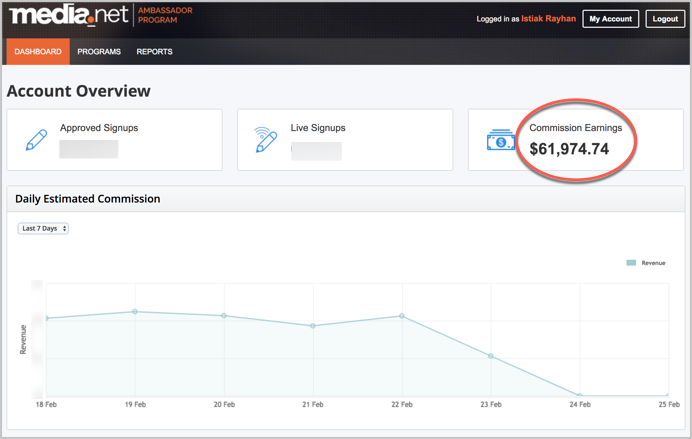
People search for alternatives when a product is expensive, unavailable in their country, hard to get approved for, or has let them down. They are already shopping. A post on AdSense alternatives written years ago on this blog ranked quickly and has earned well over $100,000 since, much of it from the Media.net program, because readers rejected by AdSense were ready to apply elsewhere the same day.
Finding ideas: look for products in your niche that are costly, hard to use, limited by country, strict about approval, or simply dominant enough that people want options.
- Pick the product and research why people leave it (reviews, forums, Reddit).
- List every real alternative, including free ones.
- If the top-ranking posts cover 10, cover 12, with a comparison table.
- Write a short verdict for each use case (cheapest, easiest, best for beginners).
- Tell the companies you listed; many will share or link the post.
Examples: PayPal alternatives for bloggers, Thrive Leads alternatives, AdSense alternatives.
2. The Coupon Code and Sale Post
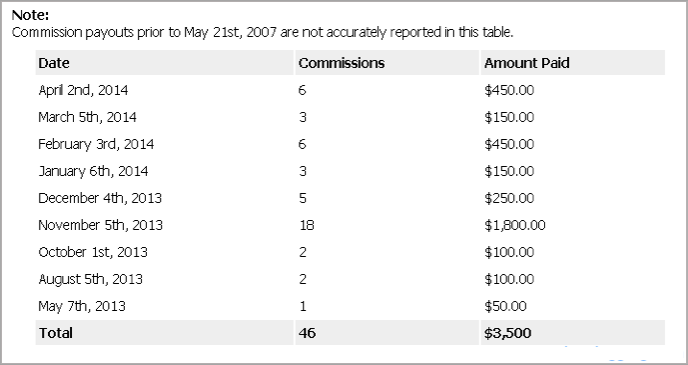
Coupon posts bring the fastest sales because the searcher has already decided to buy and only wants a discount. My first ever affiliate sale came from a post about a HostGator 1-cent coupon. Seasonal sale posts (Black Friday, Cyber Monday, New Year) convert even better; the last week of November still produces the largest affiliate payouts of the year here.
- Start with products you already promote that are earning.
- Type “[product] coupon” into Google and see whether autocomplete suggests it; if it does, people search for it.
- Ask the company for an exclusive code for your readers. Exclusive codes rank better and convert better.
- Study the top-ranking coupon pages and write a more useful one: how to apply the code, what it excludes, when it expires.
- Display codes with a plugin such as WP Coupons and Deals so your affiliate link is attached to the reveal.
- Keep the post updated; an expired code loses the ranking and the trust.
Coupon posts are competitive and Google treats thin coupon pages harshly, so each one needs real content about the product. Examples: WPZOOM coupon code, Black Friday deals for internet marketers, and our guide to boosting affiliate sales on Black Friday.
3. The “Best X” and “Best X for Y” List
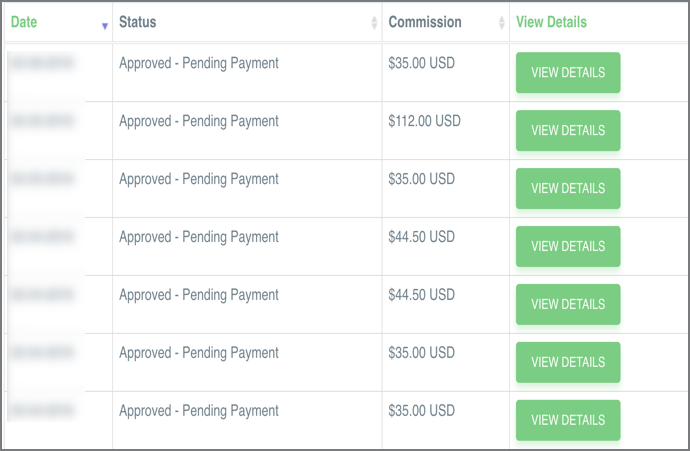
List posts work on search and social, and “best X for Y” (best WordPress themes for photographers, best laptops for video editing) is easier to rank than the bare “best X” while converting just as well. A list on this blog that put Elegant Themes first has sent them customers every month for years.
- Pick a product category in your niche.
- In Semrush or Keyword Planner, search “best [category] for” and pick the modifiers with volume you can rank for.
- Test or at least try every product; Google’s reviews system rewards first-hand evidence (screenshots, measurements, pros and cons).
- Add a comparison table, a verdict per use case, and the year in the title.
- Interlink to any single reviews you have, and update the post yearly.
Examples: high paying referral programs, best WordPress plugins for affiliate marketers, best newspaper WordPress themes.
4. The Comparison Post
Nobody searches “Bluehost vs HostGator” out of curiosity; they are choosing. “X vs Y” posts have the highest conversion rate of any type on this blog, and because you can recommend either product, you earn whichever way the reader decides.
- Choose two or three products people actually weigh against each other (check autocomplete for “X vs”).
- Compare on the criteria that matter to buyers: price, the key features, ease of use, support, limits.
- Use a comparison table near the top and a verdict per type of buyer at the end.
- Give your own recommendation and the reason.
Examples: Thrive Themes vs StudioPress, GetResponse vs iContact, GetResponse vs Marketo.
5. The Single Product Review
A review earns from people searching “[product] review” right before buying. It only works if it is a real review: your experience, screenshots, the cons, and who should not buy. Reviews written only to place a link no longer rank, and readers can tell.

- Choose a product you use or can test properly.
- Structure it: summary box with rating, what it is, key features with screenshots, pricing, pros and cons, alternatives, verdict, FAQ.
- Add Review schema through Rank Math or Yoast so stars can appear in search.
- Include any discount or free trial.
- Update it when the product changes; old pricing kills trust.
Examples: Payoneer review, Elegant Themes review, GetResponse review.
6. The “How To” Post
How-to posts are the most searched content on the web and the least obviously commercial, which is their strength. When the tutorial uses an affiliate product as the tool (“how to move a WordPress site to Bluehost”, “how to set up GetResponse”), the link is a natural step rather than a pitch, and the reader who follows the steps buys the product to complete them.
- List the problems your affiliate products solve.
- Find the how-to keywords for those problems (“how to [do X] with [product]” or just “how to [do X]”).
- Write the complete tutorial with screenshots, using the product in the steps.
- Mention the product once at the point it is needed, with the link, and again at the end.
Examples: how to move WordPress to Bluehost, how to set up GetResponse, how to manage affiliate links with ThirstyAffiliates.
7. The Resources or Tools Page
A resources page lists every tool you use with a sentence on why. It does not rank for much, but it converts the readers who already trust you, it is linked from your sidebar and about page, and it is where people go when they ask “what do you use?”. Keep it honest: only tools you use, with the free options included.
- Group tools by job (hosting, theme, email, SEO, writing).
- One or two sentences per tool, what you use it for, and the affiliate link.
- Link it from the navigation, sidebar, about page, and the end of how-to posts.
- Review it twice a year and remove anything you stopped using.
Examples: RoadToBlogging resources, WPLeaders toolbox, Smart Passive Income resources.
Making Any of These Posts Convert
- Put the affiliate link where the decision happens: in the summary box, the comparison table, and the verdict, not only in the text.
- Use buttons for the main call to action; they outperform text links.
- Disclose affiliate links at the top of the post.
- Add a table of contents on long posts so buyers can jump to the verdict (see table of contents plugins).
- Follow the on-page SEO checklist so the post ranks in the first place.
- Then work through 21 ways to increase affiliate sales from the traffic you have.
Frequently Asked Questions
Which type of post makes the most affiliate sales?
Per visitor, comparison and coupon posts convert best. In total, alternatives posts and “best X” lists earn the most because they attract far more search traffic.
How many affiliate links should a post have?
As many as the content needs and no more: usually one link per product mentioned, repeated in the summary and verdict. Linking the same product every paragraph lowers trust and can look like spam.
Do review posts still rank after Google’s reviews updates?
Yes, if they show first-hand use: original screenshots, test results, specific pros and cons, and comparisons. Reviews that paraphrase the product’s own sales page have lost rankings.
Should I write coupon posts for products I have not used?
Only if you can still add real value (how the pricing works, what the code excludes, better alternatives). A coupon page that is only a code and a link rarely ranks anymore.


Leave a Reply