

A tagline is only a few words, but it does a big job: it tells a new visitor in one glance what your blog is about and who it is for. Get it right and people know they are in the right place. Get it wrong and you confuse readers or put your blog in the wrong box.
In this guide you will see real tagline examples, 7 rules for writing a good one, free tools (including AI) for ideas, and how to add your tagline in WordPress.
What Is a Tagline?
A tagline is a short, memorable phrase that sums up what your brand or blog stands for. Famous examples are McDonald’s “I’m Lovin’ It” and Nike’s “Just Do It.” A tagline is not your logo; the logo is the visual mark, the tagline is the words.
For blogs, a tagline usually describes the topic and the reader, so visitors immediately know what to expect. Some examples:

- RoadToBlogging: “Making Your Blogging Journey Easier!” You know right away the blog is for bloggers.
- Pinch of Yum: “A food blog with simple and tasty recipes.”
- ShoutMeLoud: “Be Your Own Boss.”
- Steve Pavlina: for years used “Personal Development for Smart People,” a perfect example of naming the topic and the audience. (His current tagline is “Fully Inhabit Your Heart.”)

Looking for naming inspiration too? See these examples of good blog names.
Why Do You Need a Tagline?
Most blog names do not explain the topic, especially if the blog uses your own name. A tagline fills that gap. It reassures visitors they have landed on the right site, which keeps them reading instead of hitting the back button. It also helps search engines and AI tools understand what your site covers, and it appears in places like your homepage, social profiles, and sometimes search results.
7 Rules for Writing the Perfect Tagline
1. Match Your Mission and Audience
Your tagline should reflect why your blog exists and who it serves. Naming the reader, as “for Smart People” did, instantly attracts the right audience.
2. Keep It Super Simple
People overthink taglines and end up with something clever but confusing. Simple wins. “A food blog with simple and tasty recipes” is not fancy, but no one misunderstands it. If your draft needs explaining, simplify it.
3. Make It Easy to Understand and Remember
A little creativity helps people remember you, but clarity comes first. Aim for 3 to 8 words. Read it out loud: if it is hard to say, it will be hard to remember.
4. Use Active Voice
Active voice is direct and energetic. Nike says “Just Do It,” not “Let It Be Done by You.”

5. Start With a Verb or a Result
Show the result readers get from your blog. “Be Your Own Boss” is a promise. A fitness blog could use “Get Strong at Home in 20 Minutes a Day.”
6. Use Power Words
Some words grab attention more than others: “simple,” “proven,” “easy,” “smart,” “free.” Smart Blogger has a well-known list of power words you can browse for ideas. Use one or two; do not stuff them in.
7. Keep Your Homepage Title Short
Many blogs use “Blog Name: Tagline” as their homepage title tag. Google shows roughly the first 50 to 60 characters of a title, so keep the combination short, or the tagline gets cut off.

Free Tagline Generators
Generated taglines are rarely perfect, but they are great for sparking ideas. Mix and match words from several results, then apply the rules above.
1. Shopify Slogan Maker
Enter one word that describes your topic or values (for example, “fitness” or “simplicity”) and Shopify’s free Slogan Maker generates hundreds of slogan ideas.

2. Oberlo Slogan Generator
The Oberlo Slogan Generator works the same way: type a word and get a long list of ideas.
3. Designhill Slogan Maker
The Designhill Slogan Maker gives yet another set of ideas, useful if the first two did not inspire you.
4. ChatGPT, Claude, or Gemini
AI chat tools are now the most flexible tagline generators because you can give them context. Try a prompt like: “Suggest 20 short taglines (under 8 words) for a blog that teaches busy parents to cook healthy weeknight dinners. Use active voice and make the benefit clear.” Then ask for variations of your favorites.
How to Add a Tagline in WordPress
Method 1: Settings > General
In your WordPress dashboard, go to Settings > General, enter your Site Title and Tagline, and save. This works with every theme.
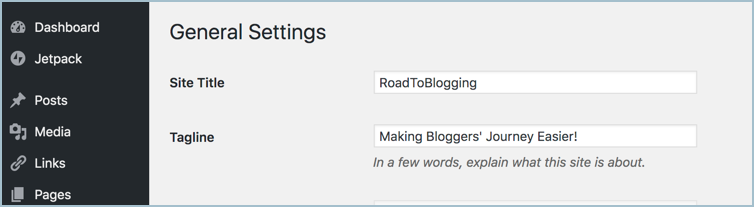
Method 2: The Site Editor or Customizer
With a block theme, go to Appearance > Editor, open your header template, and add or edit the Site Tagline block. With a classic theme, go to Appearance > Customize > Site Identity.
Method 3: Your SEO Plugin
To control how your homepage title appears in Google, set the homepage title in Rank Math (Titles & Meta > Homepage) or Yoast SEO (Settings > Homepage), for example “Blog Name: Your Tagline.”
Frequently Asked Questions
What is the difference between a tagline and a slogan?
They are often used the same way. A tagline usually represents the whole brand long term, while a slogan is often tied to a specific campaign.
How long should a blog tagline be?
Ideally 3 to 8 words, and short enough to fit after your blog name in a homepage title.
Can I change my tagline later?
Yes. Many blogs update their tagline as their focus changes. Just update it everywhere: your site, social profiles, and email signature.
Conclusion
Creating a tagline takes some trial and error, but these rules make it much easier: keep it simple, focus on your reader, and promise a clear result. Once you have it, pair it with a great blog logo. What is your blog’s tagline? Share it in the comments.


Leave a Reply