

How to Get 51% Discount on OIO Publisher Plugin
Follow the simple steps to get 51% discount….1. Go to OIO Publisher Homepage. Scroll down and click on ‘Order my copy of OIO’ 2. On the next page, give your account information and click on ‘Create Account‘.Once you’ve created your account, get your login details from your Email and login to your account.3. After login to your account, click on ‘Click here to purchase‘.On the Coupon Code field enter the coupon SPR17-RTB and click on ‘update’. Now your updated Purchase Price will be $37. (See Screenshot)
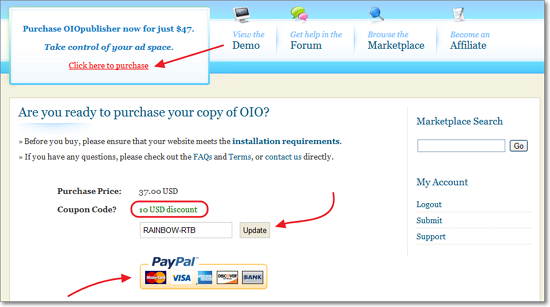 Pay your bill with Paypal.4. Go to ‘Download OIOpublisher‘ page and install the Plugin.5. Now you need to contact with me to get your cash rebate. You can use Contact Us page to send me an E-mail. Send your OIO Publisher User ID & PayPal email address. You subject can be something like “OIO Publisher Rebate”.6. I will send $14 to your Paypal account as soon as I see the E-mail.That’s it. You are done! Now start using OIO Publisher to increase your revenue.Here are some awesome benefits of having this plugin.Full Automation – Once you’ve configured the plugin, you don’t need to do anything further. Whenever advertisers pay for advertising, it will automatically add their Ads and will be removed after the expired date.Marketplace – It is a good alternative of Buysellads Marketplace. Now a days it’s really hard to get approved by Buysellads. But you are lucky enough that OIO Publisher has a marketplace where thousands of Advertiser looking for blog to publish their ads.Full Revenue – Sites like Buysellads, Blogads etc will eat up your some commission whenever they provide you a paid ad space. In OIO Publisher, there is no middleman commission. You can keep your 100% revenue.If this coupon code works for you help me by sharing this post on Facebook, Twitter, and Google+. Do let us whether it works for you or not.


Leave a Reply