
Quick Verdict
B2BKing is one of the most complete WooCommerce B2B plugins available. It turns a regular WooCommerce store into a wholesale store with business registration, group pricing, tiered pricing, quotes, bulk order forms, and subaccounts, all inside one plugin instead of five.
- Best for: wholesalers, distributors, and manufacturers selling to businesses on WooCommerce, including stores that sell to retail and wholesale customers at the same time
- Standout feature: hybrid B2B + B2C mode, which adds wholesale features for approved business buyers without changing what retail shoppers see
- Skip it if: you only need one wholesale price for one customer group (the free version or a lighter plugin will do)
- Price: free version on WordPress.org, Premium from $199 for the first year (1 site), renews at $299.50 a year
- Rating: 4.9 out of 5 on WordPress.org (109 reviews)
WooCommerce is built for selling to shoppers, not to businesses. Out of the box, every customer sees the same price, the same products, and the same checkout. A wholesale buyer who orders 500 units at a time expects something very different: their own price list, a quick way to order many items, the option to ask for a quote, and paying by invoice instead of by card.
That gap is what a WooCommerce B2B plugin fills, and B2BKing is one of the most popular options in this category. The free version alone has 10,000+ active installations on WordPress.org, and the developer says the plugin powers 15,000+ stores across its free and paid versions.
In this review, I walk through what B2BKing does, its main features, what the free version includes, how the Premium plans are priced, and who it is (and is not) a good fit for.
What Is B2BKing?
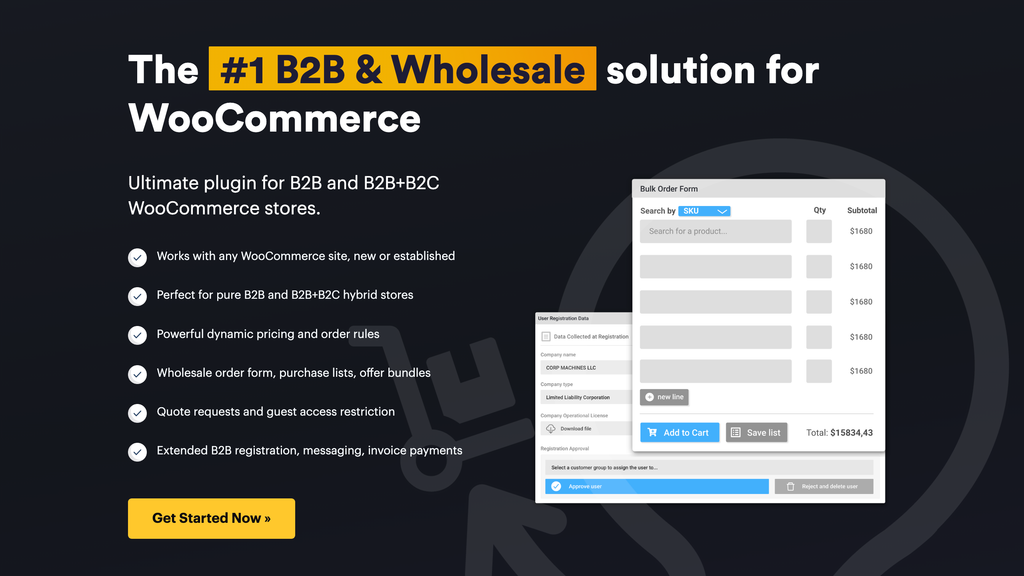
B2BKing is a WooCommerce B2B and wholesale plugin that lets one store sell to businesses, to retail shoppers, or to both at once. It is developed by KingsPlugins and has been around since 2020, with regular updates since then.
The plugin works in one of two modes:
- B2B shop: the whole store is for business customers only
- Hybrid B2B + B2C: retail shoppers see a normal store, while approved business buyers see wholesale prices and B2B features after they log in
The hybrid mode is the reason many store owners pick it. You can add B2BKing to an existing retail store without changing anything for your current customers.
At a glance
| Detail | B2BKing |
|---|---|
| Developer | KingsPlugins |
| Free version | Yes, on WordPress.org |
| Active installs (free) | 10,000+ |
| WordPress.org rating | 4.9 out of 5 (109 reviews) |
| Premium price | From $199 first year, then $299.50 a year |
| Lifetime license | Available on every Premium tier |
| Money-back guarantee | 14 days |
| Works with | Any WooCommerce compatible theme, WPML, Loco Translate |
The free version covers the basics: customer groups, wholesale prices, discount rules, and payment and shipping control per group. Most of the features that make B2BKing stand out (business registration, quotes, order forms, tiered pricing tables, subaccounts) are in Premium.
B2BKing Features
B2BKing lists 137+ features, so this section covers the ones that matter most for a typical wholesale store.
Business Registration and Approval
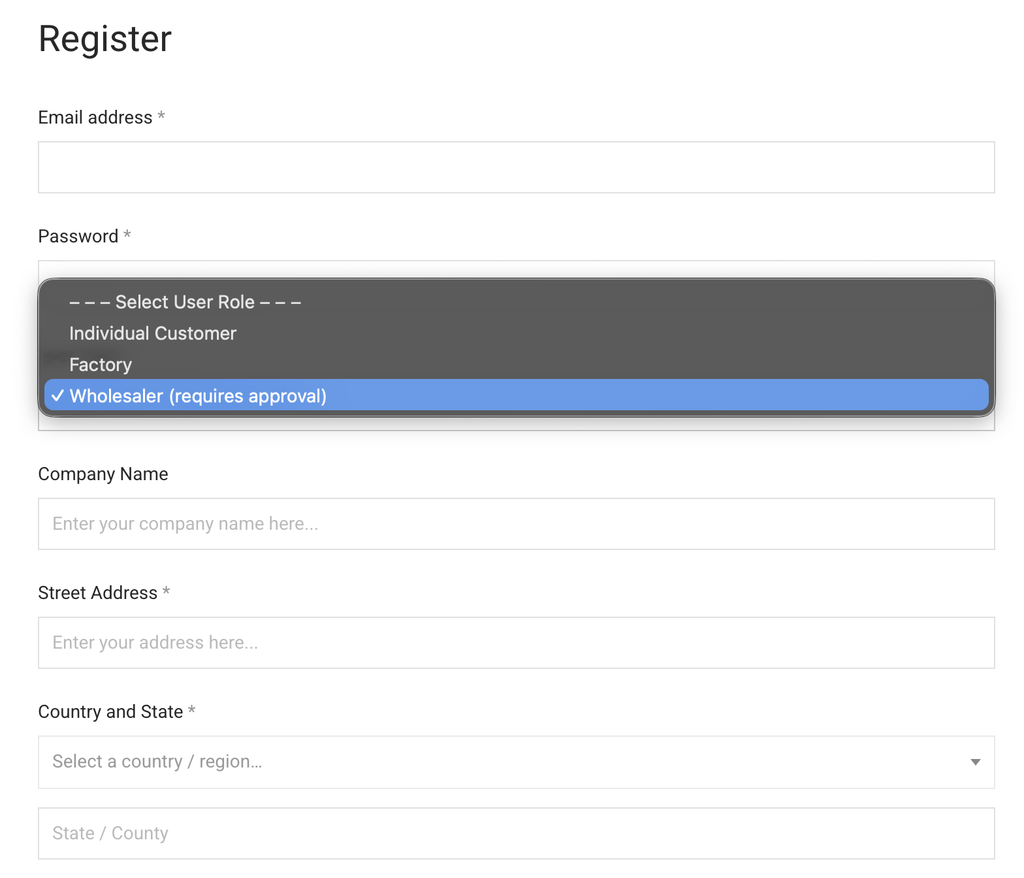
B2B stores need to know who is buying. B2BKing replaces the default WooCommerce sign-up with registration forms built for businesses.
- Separate registration for B2B and B2C customers, using a role dropdown or dedicated sign-up pages
- 9 custom field types, including text, dropdown, date, phone, and file upload (useful for asking for a business license)
- Automatic or manual approval for each registration role
- Approved users can be placed in a customer group automatically
- EU VAT number field with optional automatic validation through VIES
You review each application in the WordPress dashboard, download any uploaded files, and then approve or reject the account. Email notifications go out to you and to the customer at each step.
Customer Groups
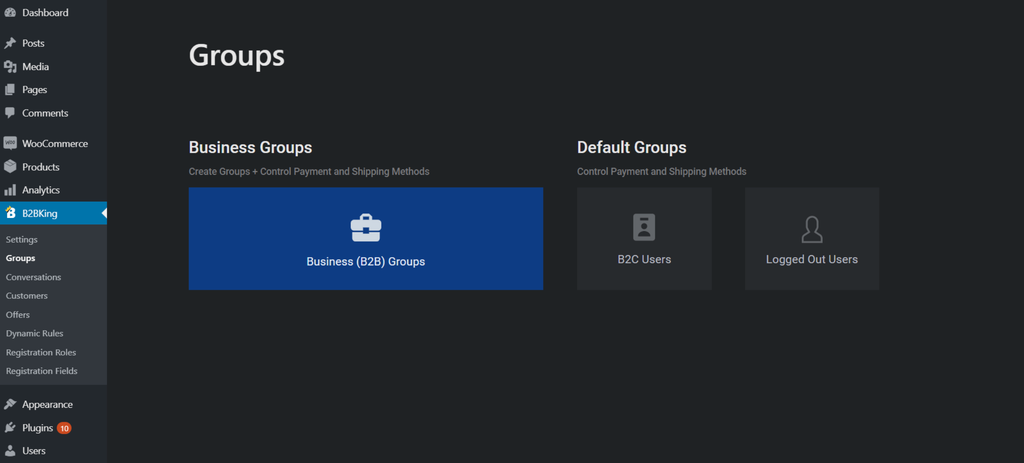
Groups are the foundation of B2BKing. You put customers into groups (for example Wholesale, Distributor, or VIP) and then give each group its own prices, discounts, payment methods, shipping methods, and product visibility.
Premium can also move customers between groups automatically. For example, a buyer who passes $100,000 in total purchases can be promoted from a 5% discount group to a 10% discount group.
Wholesale Prices and Customer-Specific Pricing
You can set a different price for the same product for each group, on both simple and variable products. For example, a product can cost $199 for retail shoppers and $179 for wholesale buyers. Business users can see the retail price next to their wholesale price, so the saving is obvious.
Premium goes further with prices for individual customers. If you negotiate a special rate with one key account, you can set that price for that customer only.
Tiered Pricing Table
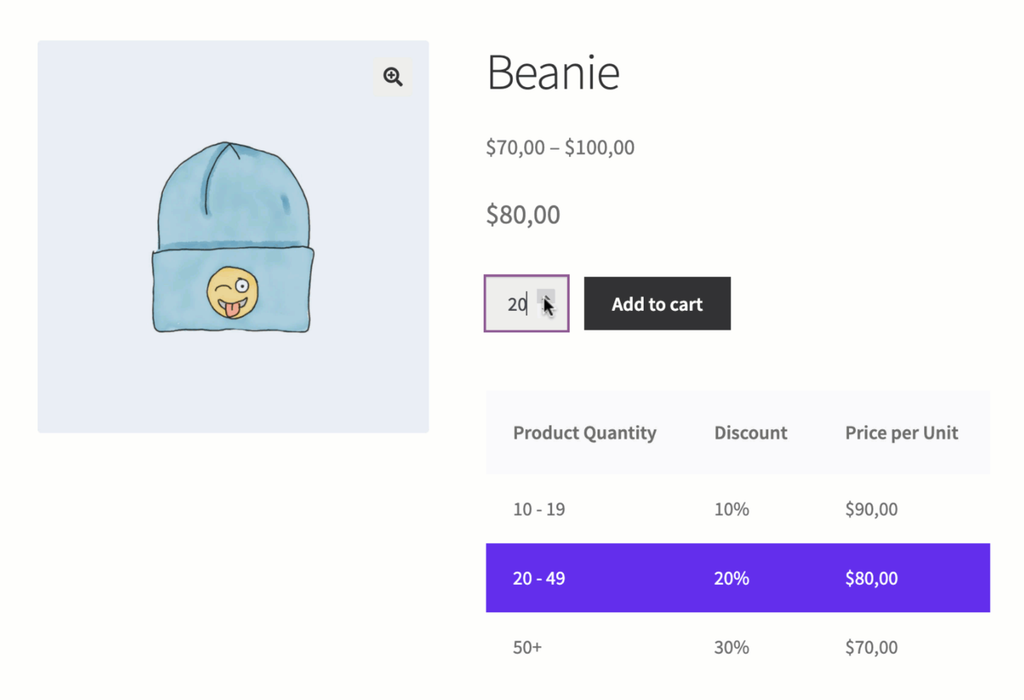
Volume discounts are standard in wholesale. With tiered pricing, you enter quantity ranges and prices in the product editor (for example, one price for 1 to 100 units and a lower price for 100 to 1,000 units). B2BKing then shows a pricing table on the product page and highlights the price that applies to the current quantity.
The table uses your theme’s styling, works with variable products, and can be set differently for each customer group. You can also create tiered percentage discounts in bulk with tiered price rules, and import tiered prices through the CSV import tool.
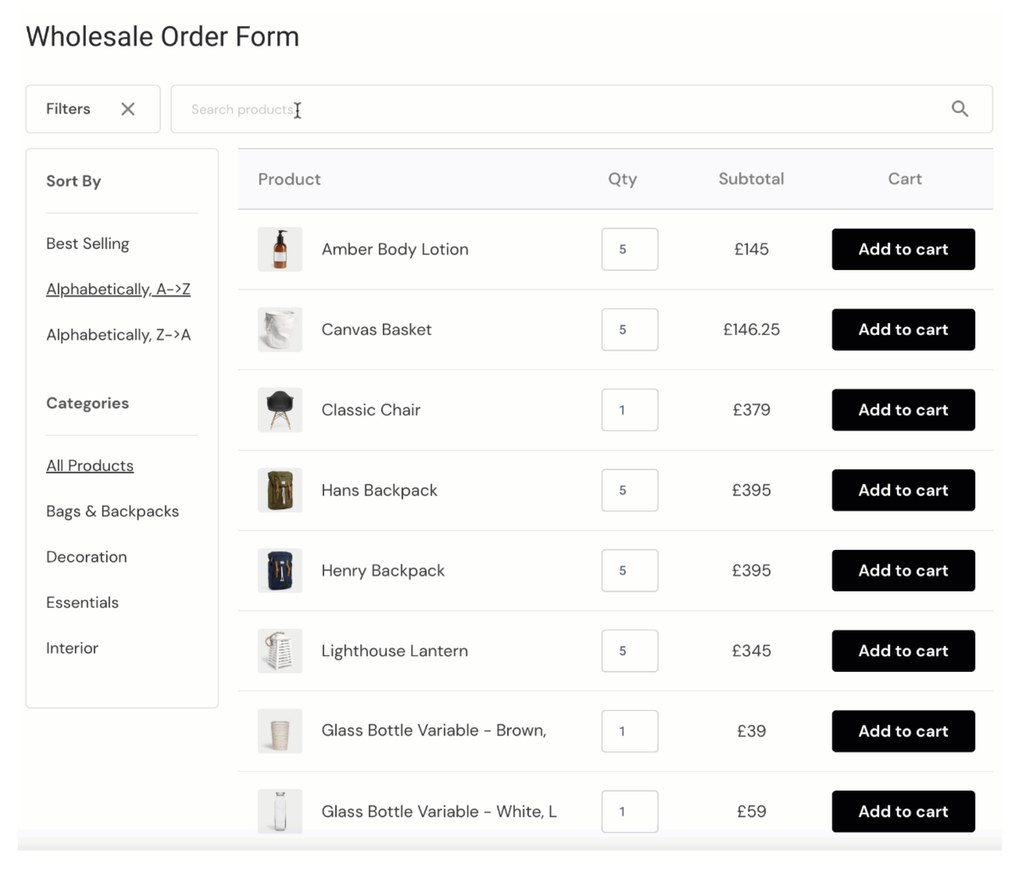
Wholesale Order Form
Wholesale buyers do not want to browse product by product. The bulk order form lets them search the catalog by product name or SKU, enter quantities, and add many items to the cart at once.
- 3 design themes: Cream, Indigo, and Classic
- Instant search with product images and a running subtotal
- Order form contents can be saved as a purchase list for reordering
- Add it to any page with a shortcode
Buyers can also upload a CSV file of SKUs and quantities to fill their cart in one go.
Bulk Variations Table
For products with many sizes or colors, the bulk variations table shows every variation in a grid. Buyers enter quantities for several variations and add them all to the cart together, instead of picking each combination from dropdowns. This is especially handy for clothing and similar catalogs.
Quote Requests, Conversations, and Offers
Not every B2B order has a fixed price. B2BKing has a full quote and negotiation workflow:
- A customer requests a quote for specific products or for their whole cart. Guests can request quotes too.
- The request opens a conversation inside the customer’s account, where both sides can message back and forth.
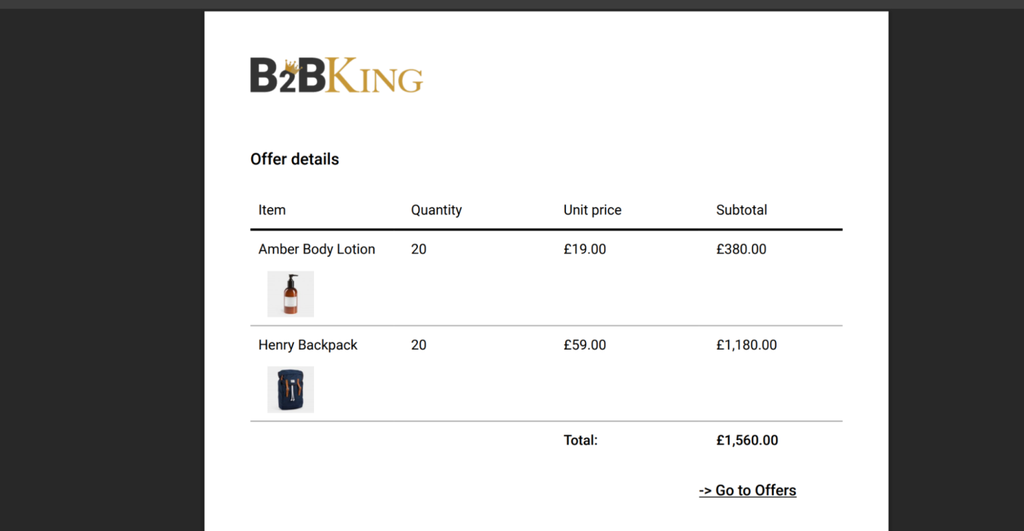
- You turn the quote into an offer with set products, quantities, and prices.
- The customer receives the offer by email or downloads it as a PDF with your logo, then buys it from their account.
You can add custom fields to the quote form (9 field types are available). Offers can also be used for seasonal deals or product bundles for a whole group.
Hide Prices and Private Store Options
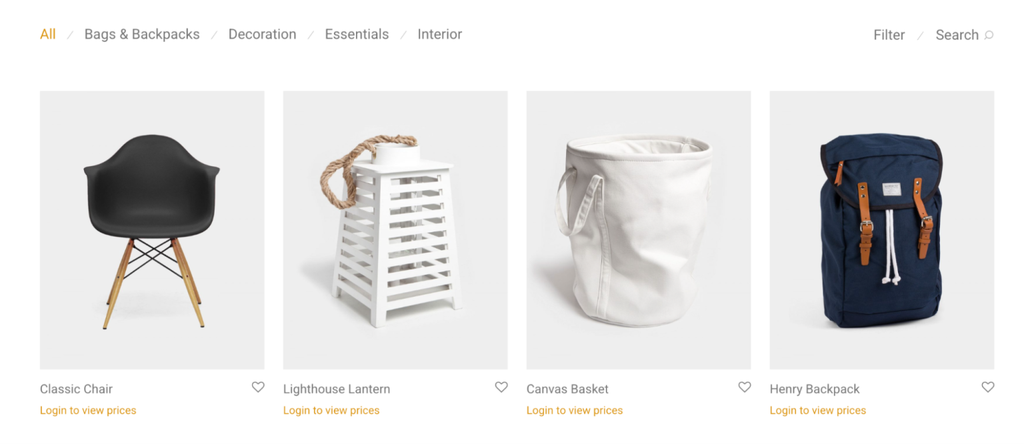
Many wholesalers do not want public prices. B2BKing lets you:
- Hide prices from logged-out visitors
- Hide the entire shop until visitors log in
- Replace prices with a quote request button for guests
- Hide prices on specific products only, using a Hidden Price rule
Product and Category Visibility
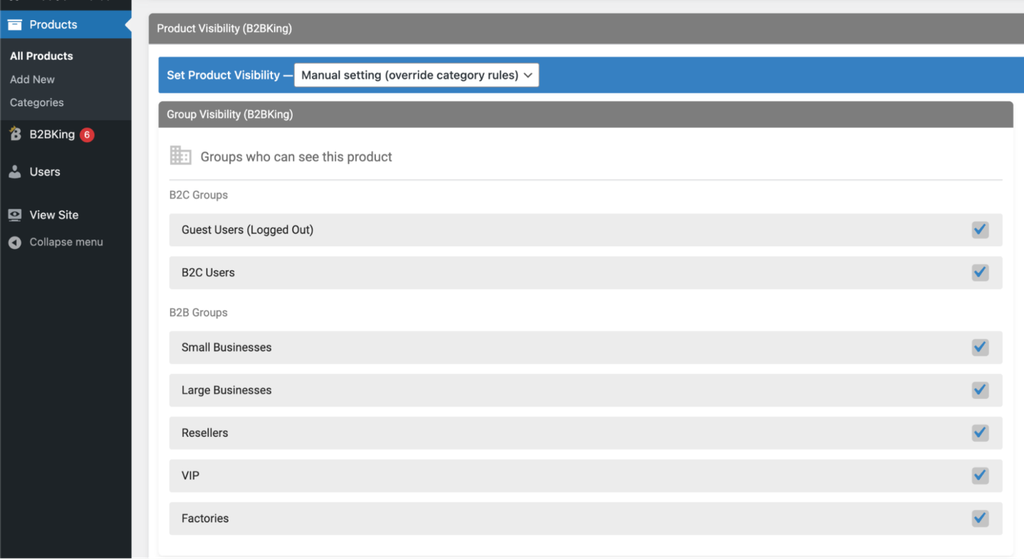
You can decide which products and categories each group, or each individual customer, can see. This is useful when some items are exclusive to certain distributors or regions. Products can follow their category’s visibility setting or have their own.
If you want a product to stay visible but not be purchasable for some users, there is a separate Non-Purchasable rule for that.
Dynamic Rules
Dynamic rules let you build pricing and order logic without custom code. Each rule targets products or categories, applies to chosen users or groups, and can have conditions such as cart total or quantity.
Rule types include:
- Percentage or fixed amount discounts
- Fixed prices and hidden prices
- Free shipping
- Minimum and maximum order quantity or value
- Required multiples (for example, a product sold only in cartons of 12)
- Tax exemptions and extra taxes or fees
- Buy X get 1 free
- Payment method discounts, surcharges, and minimum or maximum order values per payment method
The free version includes discount rules. The full rule set is in Premium.
Subaccounts and Company Order Approval
Business buying usually involves more than one person. Each business account can create subaccounts for its employees and choose what each one can do: place orders, view orders, join conversations, use purchase lists, or see offers.
With company order approval turned on, orders placed by employees go to the main account for approval before they are processed. A “Placed by” column shows which person placed each order.
Tax, VAT, and B2B Payment Options
B2BKing handles the tax rules that often complicate B2B selling:
- Show prices without tax to B2B users and with tax to B2C users
- A tax toggle so customers can switch between prices with and without tax
- Remove tax for certain groups or countries, or based on a validated VAT number
It also adds B2B payment methods: an invoice payment gateway (order now, pay later) and a purchase order gateway where buyers enter their PO number at checkout. Both can be limited to business customers.
Separate B2B and B2C Stock
You can keep separate stock quantities for business and retail customers, show exact stock numbers only to B2B users, or allow backorders for business buyers while retail shoppers see an item as out of stock.
CRM Hub and Reports
The Customers page and CRM hub bring each business account into one screen: approval status, notes, files, order history, and subaccounts. Reports split sales data between B2B and B2C customers, including gross and net sales, order count, order value, refunds, and coupons.
Add-ons and Integrations
- Company Credit add-on: gives business customers a line of credit
- Dokan and WCFM add-ons: bring B2B features to multivendor marketplaces
- SalesKing: a separate plugin from the same developer for sales agents who place orders for B2B customers
- MarketKing: a separate multivendor marketplace plugin that works with B2BKing
The Company Credit, Dokan, and WCFM add-ons are included with the Pro and Developer plans.
How to Set Up B2BKing
The basic setup with the free version takes a few minutes. These steps follow B2BKing’s official installation guide:
- In your dashboard, go to Plugins > Add New, search for B2BKing, then install and activate it. WooCommerce must already be active.
- Open B2BKing in the left menu.
- Go to Settings > Main Settings and turn the plugin on. Choose B2B shop mode or hybrid B2B + B2C mode.
- Create your business groups under B2BKing > Groups > Business Groups.
- Open any product and set the wholesale price for each group.
- Back in B2BKing > Groups, choose which payment and shipping methods each group can use.
With Premium, you add your license key under B2BKing > Settings > License, and the extra modules (registration, order form, quotes, and the rest) become available. You can switch off modules you do not need, such as the order form, conversations, offers, purchase lists, or subaccounts.
If you want to see everything before installing, B2BKing has a public live demo of both the store front end and the admin area.
B2BKing Free vs Premium
The free version is enough to test group pricing on a live store. For a real wholesale operation, you will almost certainly need Premium.
| Feature | Free | Premium |
|---|---|---|
| Customer groups | Yes | Yes |
| Wholesale prices per group (simple and variable products) | Yes | Yes |
| Payment and shipping methods per group or user | Yes | Yes |
| Percentage discount rules | Yes | Yes |
| CRM hub, Customers page, and B2B/B2C reports | Yes | Yes |
| Approval email notifications | Yes | Yes |
| Business registration with custom fields and VIES | No | Yes |
| Hide prices or the whole shop from guests | No | Yes |
| Tiered pricing and pricing table | No | Yes |
| Wholesale order form and CSV quick order | No | Yes |
| Quote requests, conversations, and offers | No | Yes |
| Customer-specific prices | No | Yes |
| Product and category visibility | No | Yes |
| Full dynamic rules (min/max order, required multiples, hidden price, and more) | No | Yes |
| Subaccounts and company order approval | No | Yes |
| Tax exemptions and tax toggle | No | Yes |
| Invoice and purchase order gateways | No | Yes |
| Separate B2B and B2C stock | No | Yes |
| Purchase lists | No | Yes |
The split above follows the free and Premium feature lists on WordPress.org.
B2BKing Pricing
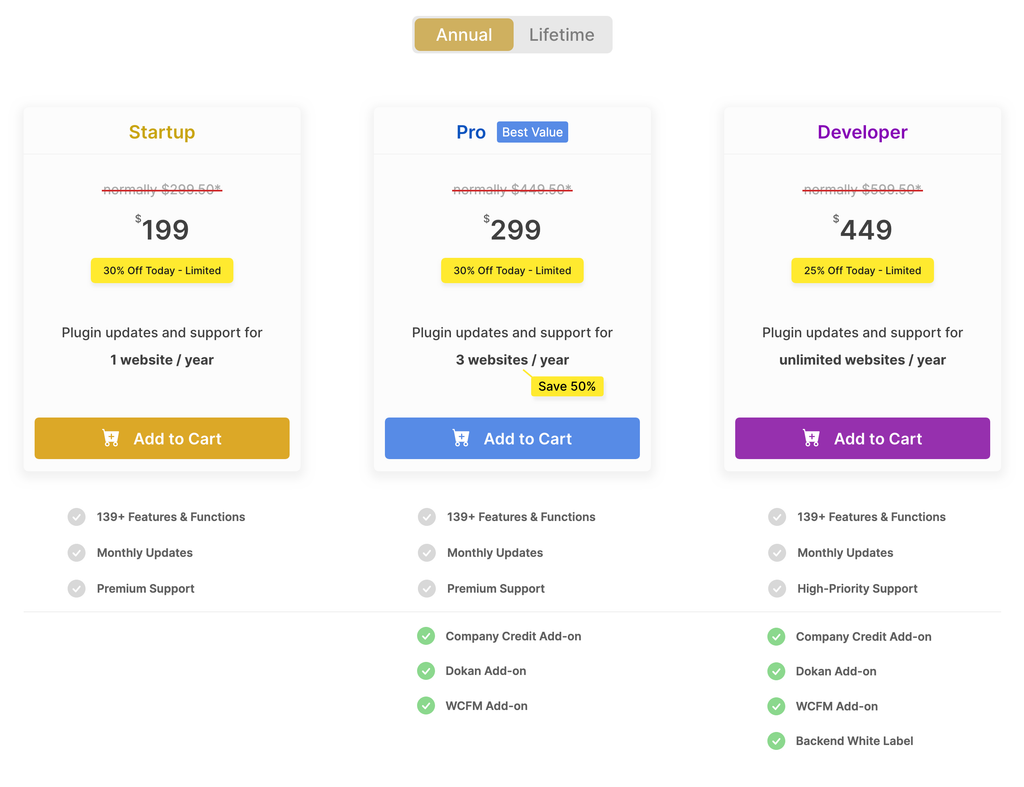
B2BKing Premium has three yearly plans. All three include every Premium feature. The difference is the number of sites and what comes on top.
| Plan | First year | Renewal (full price) | Sites | Extras |
|---|---|---|---|---|
| Startup | $199 | $299.50 | 1 | Updates and premium support |
| Pro | $299 | $449.50 | 3 | Company Credit, Dokan, and WCFM add-ons, backend white label |
| Developer | $449 | $599.50 | Unlimited | Everything in Pro, plus high-priority support |
A few things to know before buying:
- The first year is discounted. B2BKing states that renewals are charged at full price, so budget for the renewal price, not the launch price.
- Lifetime licenses are available for each tier, if you would rather pay once and skip renewals. Check the pricing page for current lifetime prices.
- 14-day money-back guarantee on every plan.
- Where to buy: the developer recommends buying directly from KingsPlugins.com. B2BKing is also sold on CodeCanyon.
Prices were checked on October 9, 2026, and B2BKing runs discounts often, so the numbers may differ when you visit.
Pros and Cons
Pros
- One plugin covers registration, pricing, ordering, quotes, payments, and tax, so you avoid stacking several wholesale add-ons
- Hybrid mode adds B2B features to an existing retail store without affecting current customers
- Strong quote workflow, with conversations, branded PDF offers, and offers sent by email
- Subaccounts and company order approval suit buyers with purchasing teams
- Flexible dynamic rules handle minimum orders, carton quantities, and payment method rules without custom code
- Very high user ratings (4.9 out of 5 on WordPress.org), with reviewers repeatedly praising support
- Lifetime licenses available
Cons
- Most of the important B2B features are Premium only
- Higher entry price than lighter wholesale plugins, and renewals are at full price after the first year
- With 130+ features, there are a lot of settings to learn, so plan time for setup
- Marketplace add-ons (Dokan, WCFM) and Company Credit need the Pro plan or higher
Documentation and Support
B2BKing’s documentation has 100+ articles covering setup, each feature, and common questions, plus developer documentation with hooks and code snippets for custom work.
Premium customers get help through a ticket system, and the developer says it aims to answer within 24 hours on business days. Free users can ask on the WordPress.org support forum. Pre-sales questions go through the same ticket system, and there is also a Facebook chat for general questions.
Support is the most common theme in B2BKing’s WordPress.org reviews, with many users naming the support person who solved their issue.
For compatibility, the developer lists themes such as Flatsome, WoodMart, Porto, XStore, Avada, Divi, and Storefront, and page builders including Elementor, Divi, Bricks, and WPBakery. It works with WPML and Loco Translate and supports WordPress multisite setups with separate B2B and B2C sites.
Final Thoughts: Is B2BKing the Right WooCommerce B2B Plugin for You?
If you sell to businesses on WooCommerce and need more than one wholesale price, B2BKing is one of the strongest choices available. Registration with approval, group and tiered pricing, quotes, bulk ordering, subaccounts, and B2B payment methods all live in one plugin, which keeps your store simpler than a stack of separate add-ons.
If your needs are small, start with the free version. It lets you set group prices and discounts on a live store at no cost. Move to Premium once you need business registration, quotes, or an order form.
The main thing to plan for is cost. Look at the renewal price, not the first-year discount, or consider a lifetime license if you expect to run a B2B store for several years.
B2BKing Review