
OptimizeCamp Review
Summary
OptimizeCamp is an AI visibility platform by DotCamp that tracks how ChatGPT, Google AI Overviews, and Perplexity mention brands. Unlike most trackers, it pairs the tracking with an optimization layer that tells you what to fix and measures whether the fix worked.
What Is OptimizeCamp and What Problem Does It Solve
Buyers have started asking AI assistants instead of Google. ChatGPT passed 900 million weekly users in early 2026, and 68% of US Google searches now end without a click to the open web, according to SparkToro’s analysis of Similarweb data.
When someone asks ChatGPT, Perplexity, or Google “best popup plugin for WordPress” or “most affordable email tool,” specific brands get named. Everyone else is invisible, and no analytics tool records any of it, because no click ever happens.
AI visibility trackers exist to measure this. Most of them stop at measurement: a dashboard that tells you you’re invisible, then leaves you there. OptimizeCamp‘s pitch is a closed loop instead: measure your visibility, fix the pages and gaps causing the problem, create the content you’re missing, and prove the change worked with before-and-after data.
That’s the claim this review tests: does the loop actually close?
Setting Up a Project
Setup starts with a brand profile: name, domain, aliases, a description, category, and your ideal customer profile. The aliases field matters more than it looks; it drives mention detection, so a brand with multiple names (like a plugin listed as “ConvertForce – Block-Based WordPress Popup & CTA Plugin” on wordpress.org) needs each variant listed.
You then add competitors and tracked prompts. Prompts come in categories: branded (“ConvertForce pricing”), comparison (“ConvertForce vs OptinMonster”), and unbranded (“best no-bloat WordPress popup plugin”). The unbranded ones are where the real competitive game happens, and the product suggests prompts based on your topics if you’re starting blank.
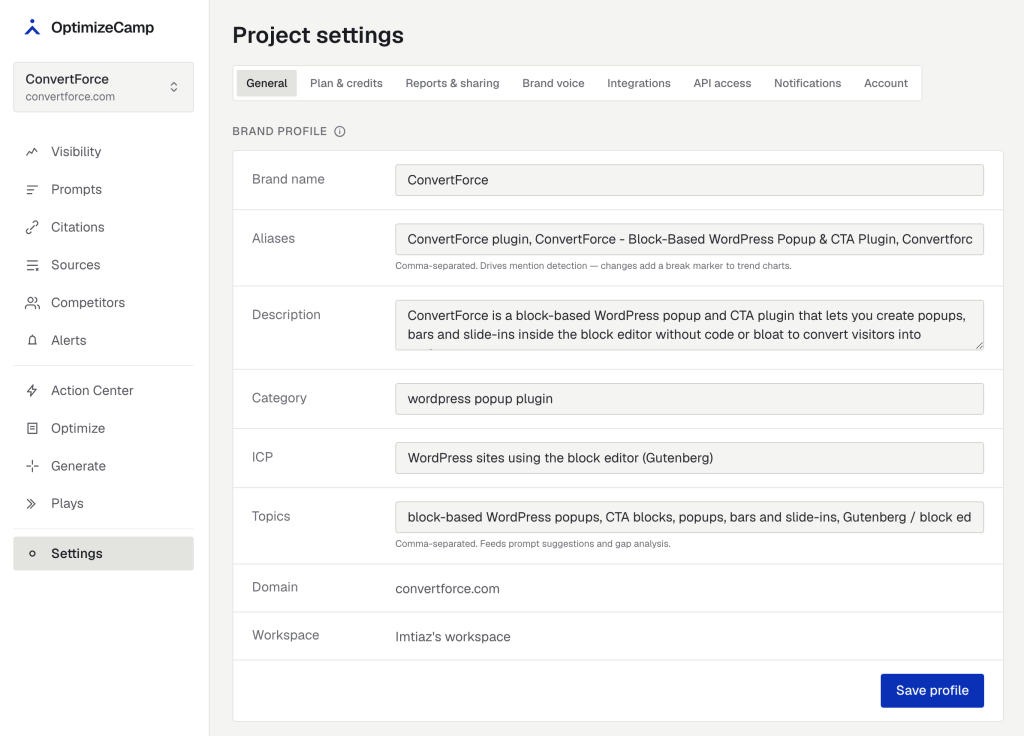
Setup for our ConvertForce project took roughly 20 minutes. The one thing I’d tell a first-time user: spend the time on prompt selection. Ten well-chosen buyer questions beat thirty generic ones, and every metric downstream depends on this choice.
The Tracking Layer
Once a tracking run completes, the Visibility page shows a 0 to 100 visibility score built from four components: mention rate, citation rate, position score, and sentiment. Our ConvertForce project scored 50.1 on its baseline run, with a 52% mention rate and 40% citation rate across 30 analyzed answers.
The per-platform split matters more than the headline number. ConvertForce scored 57.2 on ChatGPT but only 45.1 on Perplexity, which immediately tells you where the work is.
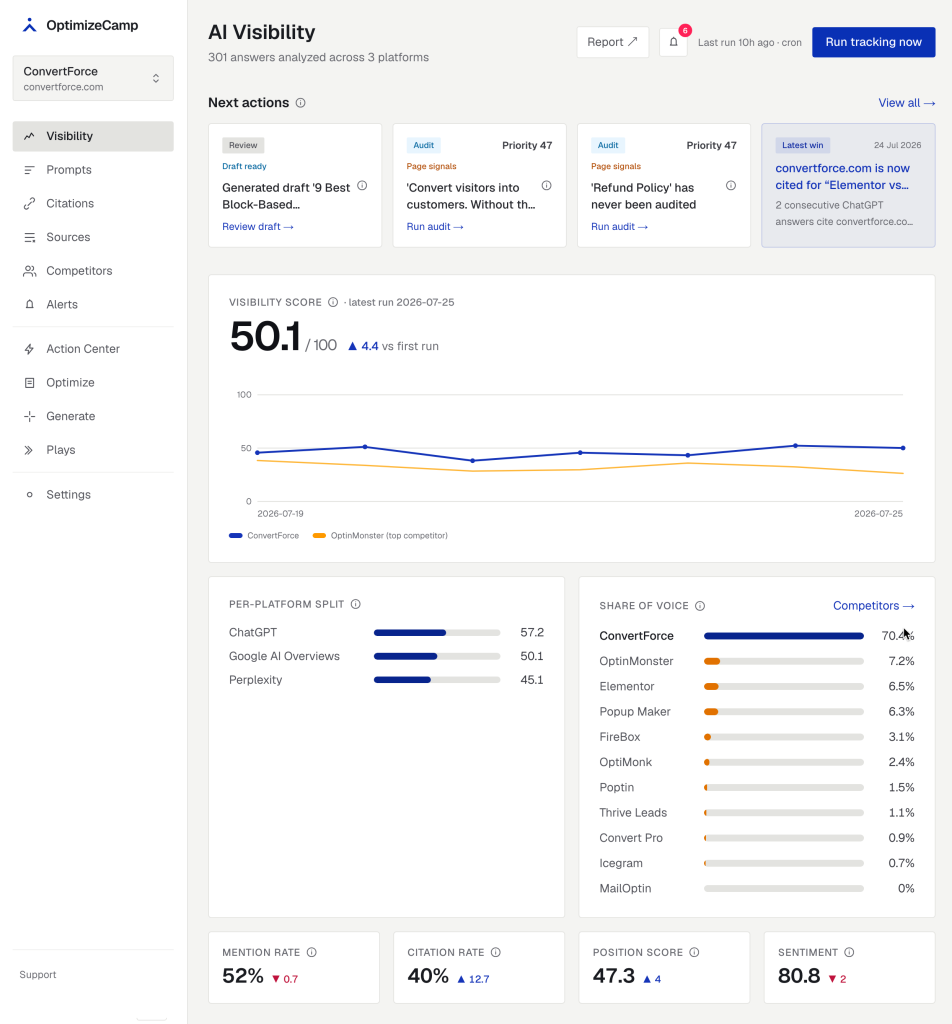
Share of voice puts your brand against competitors on the same prompts. ConvertForce held 70.4%, with OptinMonster at 7.2% and Elementor at 6.5% behind it.
The Competitors page is the best screen in the product. It benchmarks every tracked brand from the same snapshot set, and a head-to-head view shows each prompt with your position, your competitor’s position, and a verdict per platform. Against OptinMonster, ConvertForce led on 3 neutral prompts, trailed on 4, and tied on 1. That’s the level of detail where “we should improve our AI visibility” becomes “we’re losing the pricing-comparison prompt on both platforms.”
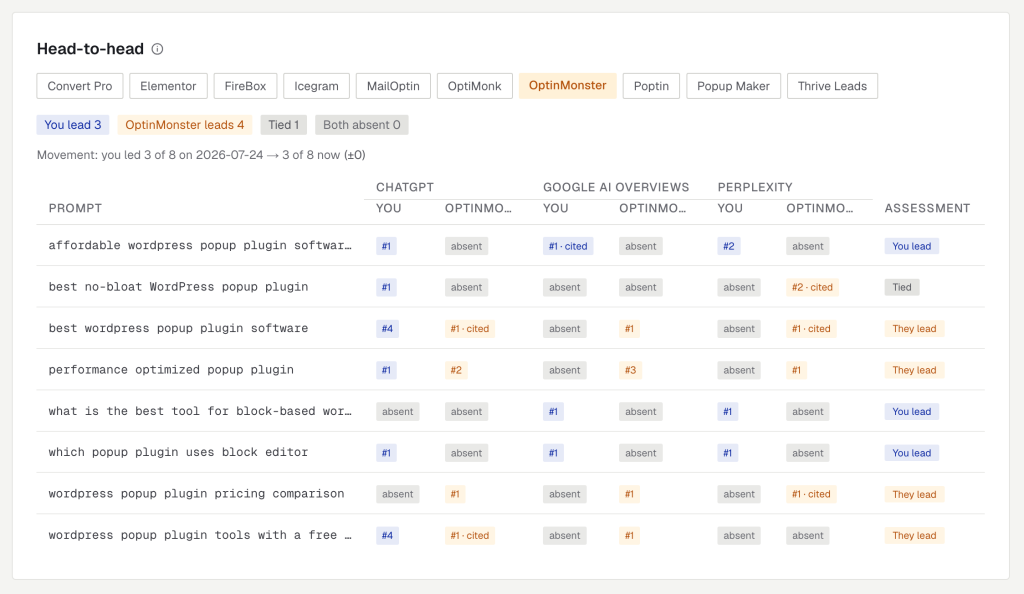
One design decision worth praising: the Competitors page states its benchmark scope explicitly, measuring only neutral unbranded prompts by default so no brand gets flattered by its own branded queries. Scores differ from the main Visibility page as a result, which confused me for a minute, but the methodology note explains it, and it’s the honest way to benchmark.
The Optimization Layer
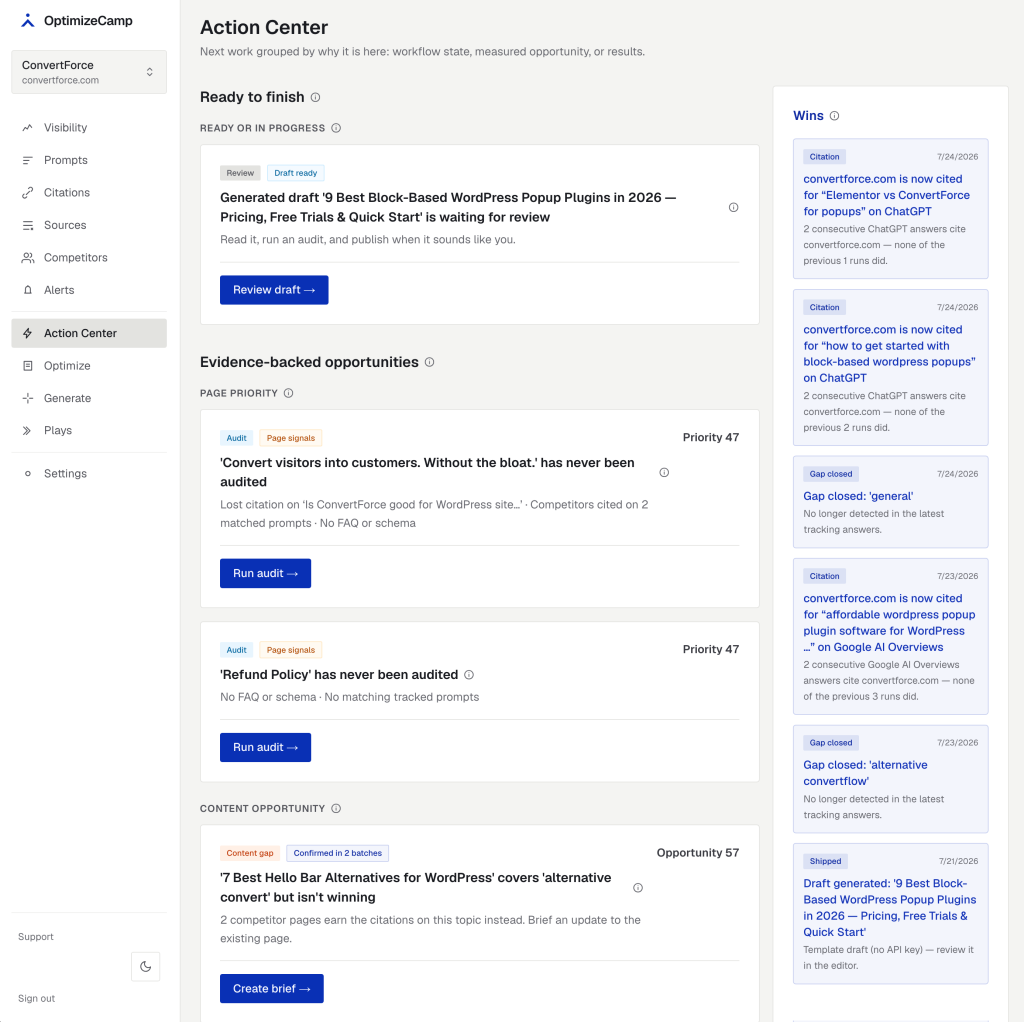
This is where OptimizeCamp separates from the pure trackers. The Action Center turns tracking data into a ranked work queue with the evidence attached.
Real examples from our projects: “AI cites youtube.com on 8 of your prompts. You have no profile there. Elementor, Icegram, MailOptin show up.” Or: “AI cites wordpress.org on 14 of your prompts,” with ConvertForce absent from those citations while competitors appeared 47 times. Each opportunity carries a priority score and a playbook button that generates the specific steps to capture it.
The Sources view generalizes this: every third-party domain AI cites on your prompts, how often, whether you’re present there, and which competitors are. On ConvertForce’s prompts, AI leaned on wordpress.org (47 citations), youtube.com (22), and reddit.com (21). Knowing that AI trusts those three surfaces for your category is worth more than any single score, because it’s a literal to-do list for earned visibility.
The Generate module mines gaps: answers where competitors appear and you don’t, competitor pages earning citations you have no equivalent for. The Optimize module audits individual pages for extractability and schema. Both feed the same loop: every published fix gets re-measured by the next tracking runs, and improvements land in a Wins column.
Alerts and Reporting
Alert rules cover the events that actually matter: visibility drops, lost prompts, lost citations, new competitors appearing in your answers, share-of-voice overtakes, and wins. Alerts can hit Slack via webhook or email for critical events.
For agencies, projects support white-label client reports with custom branding and shareable client links. Combined with the $499 Agency tier’s 10 projects, the agency use case is clearly deliberate rather than an afterthought.
What Two Weeks of Real Tracking Surfaced
The findings that changed our own roadmap, from the ConvertForce project alone:
- A near-invisible citation gap. ConvertForce was mentioned in over half of answers but cited in under a quarter. AI talks about the brand without linking to it, which means the mentions build no traffic and no reinforcement. The fix list: more citable reference pages.
- wordpress.org is the kingmaker. The single most-cited domain on our prompts, and our listing was doing none of the work. Optimizing a plugin’s wordpress.org page for extraction is worth more than most blog posts.
- Platform asymmetry is real. Being strong on ChatGPT said nothing about Google AI Overviews. They cite different sources and reward different signals, and treating “AI visibility” as one number hides that.
None of these insights required interpretation skill. The product stated them, with the evidence, ranked.
Pricing
| Plan | Price | Projects | Tracked prompts | Key limits |
|---|---|---|---|---|
| Starter | $79/mo | [X] | [X] | [X audit credits, X article credits] |
| Pro | $199/mo | [X] | [X] | [X audit credits, X article credits] |
| Agency | $499/mo | 10 | 300 | 200 audit credits, 40 article credits, white-label reports |
Add-on packs extend credits, and every plan carries a 14-day money-back guarantee. There is no free plan; the money-back window is the trial.
Context against the market: enterprise AI visibility platforms like Profound price for enterprise budgets, typically starting around several hundred dollars monthly and scaling well beyond. OptimizeCamp’s $79 entry undercuts that meaningfully, though tools like Otterly offer cheaper entry tiers for tracking alone. You’re paying OptimizeCamp for the optimization layer, not just the tracking.
What OptimizeCamp Doesn’t Do Yet
The honest list:
- Not every platform yet. ChatGPT, Google AI Overviews, and Perplexity are live; Gemini and Copilot are still on the roadmap. If Gemini visibility is critical to your business today, that coverage isn’t here yet.
- It’s young. The product launched in 2026. It’s moving fast, but you’re adopting early, with the occasional rough edge that implies.
- No free tier. The 14-day guarantee is a fair trial mechanism, but a credit card is required to look inside.
- AI answers are non-deterministic. The same prompt returns different answers on different runs, so scores fluctuate between runs. OptimizeCamp handles this with multi-run trend lines rather than single-snapshot judgments, but expect movement, and distrust any tool in this category that shows perfectly stable numbers.
- Small-sample metrics need care. Sentiment scores on brands with a handful of mentions can read as confident 100s. Trust the metrics more as mention counts grow.
OptimizeCamp vs Surfer vs Profound vs Peec vs Otterly
| Tool | Positioning | Best for |
|---|---|---|
| OptimizeCamp | Closed-loop tracking + optimization, WordPress integration | SMBs, WordPress businesses, agencies |
| Surfer | SEO content suite with AI tracking bundled across five engines | Teams already writing in Surfer |
| Profound | Enterprise AI visibility suite | Large brands with enterprise budgets |
| Peec | Tracking-focused, multi-platform | Marketing teams wanting monitoring depth |
| Otterly | Lightweight tracking, low entry price | Solo founders testing the waters |
The one-line summary: the competitors answer “what does AI say about us.” OptimizeCamp also tries to answer “and what do we do about it.” Whether that second question is worth the price difference depends on whether you have the team to act on prescriptions; if you only want monitoring, cheaper options exist.
Who Should Use It, Who Should Skip It
Use it if: you run a WordPress-based business or agency, your buyers ask AI assistants category questions, and you want a ranked list of actions rather than a metrics dashboard.
Skip it if: you need Gemini or Copilot coverage today, you want a free tier for casual monitoring, or you have no capacity to act on recommendations, in which case tracking alone is cheaper elsewhere.
FAQ
Is OptimizeCamp worth it?
For businesses whose buyers ask AI assistants category questions, yes, with one condition: you need capacity to act on its recommendations. The tracking tells you where you stand, but the price is justified by the optimization layer, and that layer only pays off if someone implements the playbooks.
Does OptimizeCamp have a free trial?
There is no free plan. Every plan includes a 14-day money-back guarantee, which functions as the trial period.
What platforms does OptimizeCamp track?
ChatGPT, Google AI Overviews (including Google’s AI Mode surface), and Perplexity. Gemini and Microsoft Copilot are on the public roadmap.
How is OptimizeCamp different from Profound?
Profound is an enterprise AI visibility suite priced for large brands. OptimizeCamp targets SMBs, WordPress businesses, and agencies at a $79 entry point, tracks ChatGPT, Google AI Overviews, and Perplexity, and pairs that tracking with a prescriptive optimization layer: ranked opportunities, playbooks, page audits, and before-and-after measurement.
Who makes OptimizeCamp?
OptimizeCamp is built by DotCamp, a WordPress product company founded in 2017 with nine plugins and more than 115,000 active installs. It’s published under DotCamp LLC.
Final Verdict
4.5 / 5. OptimizeCamp does the thing its category mostly doesn’t: it connects “here’s what AI says about you” to “here’s what to do about it” and then measures whether it worked. The two-platform launch scope and the product’s youth cost it half a point, and both are known and roadmapped.
If AI assistants are becoming a discovery channel for your market, and they are, tracking without acting is half a strategy. OptimizeCamp is the most complete answer I’ve used for the other half.